






30 juillet 2026
Chaque créateur d'apps, noté sur six critères
Nous notons chaque plateforme de création d'applications de 1 à 10 sur la facilité de construction, le prêt pour la production, la maintenabilité, la sécurité et le contrôle d'accès, les données et intégrations, et la flexibilité du design. Lisez une fiche de score et vous saurez les lire toutes.
- 21plateformes notées
- 6critères, une seule échelle
- 126notes, chacune justifiée
- 210comparatifs face à face
- 52classements par usage
Les 21 plateformes, classées
Qu'est-ce qui compte le plus ?
Classement sur les six critères, à poids égal. Ouvrez une ligne pour voir ses six notes et leur justification.
-
App builder no-code propulsé par l'IA pour les applications métier telles que les portails clients et les outils internes.
- 9.0 Facilité de construction Describe the app and the AI Co-Builder generates the database, pages, permissions, and navigation in minutes; everything it builds can also be configured manually in the visual editor, so you are never stuck re-prompting.
- 8.5 Prêt pour la production Authentication, user groups, row-level permissions, and hosting ship pre-built on every app, with SOC 2 Type II compliance and EU data hosting. The foundation a portal needs is platform infrastructure, not generated code.
- 9.0 Maintenabilité There is no generated codebase to maintain. Apps are composed of native, battle-tested blocks with visual settings, and the AI has near-parity with manual editing, so any change can be made by hand without prompting or credits.
- 8.5 Sécurité et contrôle d'accès Password, OTP, magic-link, and Google sign-in are toggles, user groups carry row-level data restrictions down to individual buttons, and database operations run server side. SSO is reserved for the enterprise Custom plan, which costs the half point.
- 8.0 Données et intégrations Native Softr Databases plus external sources including Airtable, Google Sheets, and Notion; SQL and REST API connections sit on the Business plan, which costs the score half a point.
- 5.5 Flexibilité du design A global theme engine sets colors, fonts, sizing, and border radius, with block-level styling, custom CSS, and an AI Vibe Coding block for custom components. The ceiling is real: apps are composed from native blocks, not pixel-perfect freeform layouts.
-
Environnement de développement cloud doté d'un agent IA autonome capable de générer et de déployer du code réel.
- 6.5 Facilité de construction The Agent scaffolds and deploys working apps from prompts in one place, which is genuinely fast for a code-producing tool; it still assumes a technical baseline for managing secrets, reading errors, and debugging deploys, which keeps it short of the no-code leaders.
- 8.0 Prêt pour la production Autoscaling deployments, managed PostgreSQL with rollbacks, and custom domains are genuine production infrastructure rather than a preview sandbox, the strongest line on this card; the deductions are reported deployment-to-editor mismatches and agent-introduced bugs.
- 7.5 Maintenabilité The output is real, version-controlled code you can edit by hand or hand to a developer, so it ages far better than prompt-only tools and never traps you in regeneration; agent debugging loops that reintroduce bugs and consume credits are the remaining deduction.
- 6.0 Sécurité et contrôle d'accès Managed databases, secrets management, and standard auth libraries are available and proven, but roles and permissions still live in agent-written code, so verifying who can access what means reading it rather than checking a panel.
- 8.0 Données et intégrations Managed SQL databases plus the ability to integrate anything code can reach across 50+ languages, so the ceiling is the whole ecosystem; it sits at the level of the strongest platforms here, held just short only because managing schemas requires Postgres knowledge.
- 8.5 Flexibilité du design Real code in 50+ languages means any interface a developer could build, Replit can host: custom frontends, dashboards, and APIs without template constraints.
-
L'agent de codage basé sur le terminal d'OpenAI qui lit votre dépôt, écrit du code et ouvre des pull requests.
- 4.0 Facilité de construction The agent works autonomously inside a repo, creating branches and running tests, which lifts it slightly above an assistive IDE; but it is a terminal tool with no visual interface and is documented as unusable for non-technical users, so a non-engineer gets nowhere.
- 7.0 Prêt pour la production Codex produces real code on real stacks, runs tests, and opens pull requests, so a competent team can ship production software with it; the deduction is that every diff needs human review, and users report the agent overcomplicating scope and forgetting project nuances.
- 8.0 Maintenabilité Native git branches, descriptive commits, and pull-request workflows mean changes are version-controlled and reviewable, and parallel containerized tasks plus low token overhead make large refactors tractable. The strongest line on this card for a technical team.
- 6.0 Sécurité et contrôle d'accès Parallel work runs in isolated containerized branches, which helps, but granting a terminal agent permission to run local scripts carries real sandboxing risk, and any app-level auth or permissions are code the engineer must write and verify.
- 8.5 Données et intégrations Operating directly in a codebase, Codex can reach any database, API, or service the language supports, with native GitHub integration. The ceiling is the whole ecosystem; it sits just below the top because every connection is code you write, not a pre-wired connector.
- 9.0 Flexibilité du design The output is raw code, so interface freedom is bounded only by the engineer and the framework, matching the most flexible tools on this site. The freedom is the developer's to realize rather than the tool's to grant.
-
Constructeur full-stack visuel avec des flux de logique personnalisés et une base de données gérée.
- 5.0 Facilité de construction The editor is deep but dense. Database design, workflow conditionals, privacy rules, and API connections take a significant time investment to master; Trustpilot reviewers describe a developer-like conceptual understanding as the real entry requirement.
- 7.0 Prêt pour la production Auth, server-side privacy rules, and a backend scheduler are built in and proven at scale; the point deductions come from configuration being entirely on you, editor RAM and stability complaints, and reported payment integration inconsistencies.
- 6.0 Maintenabilité Logic lives in visual workflows you edit directly, so changes never require regeneration. The deductions: complex apps accumulate workflow sprawl that is hard to audit, and builders report editor RAM problems on large projects.
- 6.5 Sécurité et contrôle d'accès Server-side privacy rules and role-based access are built in and proven, but configuration is entirely on the builder. Trustpilot reviewers describe secure privacy rules as requiring developer-like understanding, and a missed rule fails silently.
- 8.0 Données et intégrations Managed relational database with custom data types, an API Connector for any REST service, and a marketplace of over 8,000 plugins. The half-step off a higher score reflects dependency risk on community plugins that can break or be abandoned.
- 8.5 Flexibilité du design A pixel-level drag-and-drop editor with absolute or responsive positioning and a responsive design system. The strongest line on this card: among no-code platforms, only code-gen tools offer comparable interface freedom.
-
Constructeur visuel pour outils internes, où le SQL et le JavaScript effectuent le travail réel.
- 4.0 Facilité de construction Retool is not a true no-code tool. Anything beyond a basic layout requires writing SQL queries, structuring data in JavaScript, and debugging API responses; Capterra reviewers describe it as primarily for developers and engineering leaders familiar with both languages.
- 7.5 Prêt pour la production Built for internal tools with version control, environment branching, and self-hosting on Enterprise. Deductions come from external auth flows having to be engineered by hand and Capterra reports of post-update UI bugs and a saving issue where SQL content disappeared.
- 6.0 Maintenabilité Version control and release management help, but a G2 reviewer notes that apps get harder to maintain and keep organized as they grow, and one Capterra user reported keeping an external copy of all code after a save bug.
- 7.5 Sécurité et contrôle d'accès Granular access controls on Business, SSO via SAML, plus audit logs and source control on Enterprise. The deduction is that external user login, signup, and permission flows are not native and must be built with custom code.
- 8.5 Données et intégrations Directly reads and writes SQL databases and REST or GraphQL APIs, ships a managed PostgreSQL database, and carries a broad connector library. This is the strongest line on the card and the reason engineers reach for it.
- 7.0 Flexibilité du design Over 100 pre-built components plus custom JavaScript libraries give real control, but the library is tuned for data density. Reviewers note apps look like internal tools unless heavily customized, and client-facing polish takes significant development effort.
-
L'outil agentique en ligne de commande d'Anthropic qui édite des fichiers, exécute des tests et gère git depuis votre terminal.
- 4.0 Facilité de construction The agent edits files, runs tests, and manages git autonomously, which lifts it slightly above an assistive editor; but it lives entirely in the terminal with no visual interface, so a non-engineer who cannot set up an environment and read code gets nowhere.
- 6.0 Prêt pour la production It produces real code on real stacks and can run the tests that prove it, but the deduction is heavy: on larger repos documented context compaction drops project constraints and outputs incorrect logic, and reported latency on complex tasks slows the review loop the tool depends on.
- 6.5 Maintenabilité Direct file editing, automated commits, and git history keep changes version-controlled in your own repo, but early context compaction makes the agent forget constraints set in project memory on large codebases, so long sessions need close supervision to stay coherent.
- 6.0 Sécurité et contrôle d'accès Granular per-action permission prompts mean nothing runs without approval, a genuine access-control strength; the offset is that a terminal agent with system-level write access is risky if a destructive script slips through, and app-level auth is still code you write.
- 8.0 Données et intégrations Working in a real codebase, Claude Code can reach any database, API, or service the language supports, and it executes shell commands directly. The ceiling is the ecosystem; it sits below the top because every connection is code you write, not a pre-wired connector.
- 9.0 Flexibilité du design The output is raw code, so interface freedom is bounded only by the engineer and the framework, matching the most flexible tools on this site. The freedom is the developer's to realize rather than the tool's to grant.
-
Une base de données relationnelle avec l'aspect d'un tableur et une couche d'Interface Designer intégrée.
- 8.5 Facilité de construction The spreadsheet-relational interface is the most intuitive in the category for non-technical users to build and modify data schemas, and the drag-and-drop Interface Designer puts a usable app surface on top without code.
- 5.5 Prêt pour la production Interfaces work for internal collaborators, but they are desktop-focused, lack native external login and onboarding flows, and reviewers report performance degrading as bases grow and API rate limits around 5 requests per second per base causing sync delays.
- 7.0 Maintenabilité Schema changes are direct edits in a familiar grid, which keeps day-to-day upkeep simple, but performance degrades as bases grow, formulas multiply, and automation steps increase, which complicates larger builds.
- 5.0 Sécurité et contrôle d'accès Interface Designer relies on base-level roles, so access cannot easily be restricted down to the record, field, or page level for specific user types. External portal access is gated behind paid guest packs rather than a native auth model.
- 8.0 Données et intégrations Rich field types (linked records, lookups, rollups, formulas), multiple views, real-time multi-source sync, and an extensive native connector library with strong Zapier, Make, and API compatibility. A genuine strength of the platform.
- 4.0 Flexibilité du design Interface Designer uses restricted, blocky layouts that force an admin-like aesthetic, does not translate well to smaller screens, and always carries Airtable branding with severely limited white-labeling.
-
Constructeur low-code qui transforme les tableurs et les bases de données en applications web et mobiles professionnelles.
- 8.5 Facilité de construction Instantly scaffolds structured app layouts from Google Sheets, Airtable, or Excel; even critics on Reddit call it very slick and easy to learn, with polished components that adapt to any screen automatically.
- 6.5 Prêt pour la production Pre-configured components are reliable and mobile-optimized, but a long-term user reports system lags 5 to 10 times a year with clients depending on the apps, and free-plan users get no human support.
- 6.5 Maintenabilité Apps are maintained by editing components and data directly, which keeps day-two changes simple; the deductions come from users reporting features moving behind higher tiers mid-project and a hard ceiling once logic needs deepen.
- 5.5 Sécurité et contrôle d'accès User access and row-level controls cover internal teams well, but the permission model is thinner than portal-focused platforms once you need granular visibility rules for external user groups.
- 7.0 Données et intégrations Connects to Google Sheets, Airtable, Excel, and its own Glide Tables with relations, rollups, and built-in AI columns; deeper backend or headless connections are where it thins out.
- 4.0 Flexibilité du design Layouts conform to Glide's templates: polished and mobile-optimized, but with no free drag-and-drop and custom CSS reserved for top tiers. You ship Glide's look, not your brand's.
-
Éditeur visuel pour applications mobiles natives avec export complet du code Flutter.
- 4.5 Facilité de construction Reviewers describe a steep learning curve requiring an understanding of Flutter layout logic, state management, and relational databases, plus debugging without useful error messages.
- 7.0 Prêt pour la production Compiles to native iOS and Android packages with codeless deployment pipelines to Google Play and TestFlight; auth and database rules still require manual Firebase or Supabase configuration.
- 5.5 Maintenabilité Visual widget trees are edited directly and Dart export keeps a code path open, but the browser editor lags past roughly a dozen screens and state management complexity grows with the app.
- 5.0 Sécurité et contrôle d'accès Authentication and database security rules live in the Firebase or Supabase backend and must be configured manually there; the platform provides the hooks, not the protection.
- 6.5 Données et intégrations Native Firebase and Supabase support plus customizable REST API integrations; connecting them means manually configuring database rules, authentication services, and API structures.
- 9.0 Flexibilité du design Widget-level visual control over genuinely native iOS and Android interfaces, the strongest mobile design ceiling in this roster; Flutter Web output is the one weak surface, loading heavily for public sites.
-
Un éditeur de code conçu autour de l'IA, dérivé de VS Code, qui opère directement au sein d'une base de code réelle.
- 3.0 Facilité de construction For an engineer, Cursor accelerates real work substantially. For a non-engineer it is the wrong tool: it assumes you can read code, run builds, configure packages, and debug errors. The score reflects the typical buyer comparing it to no-code builders, where it is the hardest entry on this site.
- 6.0 Prêt pour la production Whether a Cursor project ships to production depends entirely on the engineer using it, because the tool builds nothing turnkey: hosting, databases, auth, and scaling are all manual. Reviewers also report Agent mode making unintended multi-file changes that require careful rollbacks.
- 6.5 Maintenabilité You own standard source code in your own repository, the healthiest possible exit path, and Cursor excels at refactoring and adding tests. The deduction: Composer can modify peripheral config files and get stuck in dependency loops, so AI-driven edits still need human review.
- 5.5 Sécurité et contrôle d'accès There is no built-in auth or permission layer; the engineer architects the entire auth system, so the ceiling is unbounded but nothing is provided. Cursor itself adds a compliance question: enterprise reviewers cite difficulty getting codebase scanning approved by security teams even with privacy mode on.
- 7.5 Données et intégrations Operating in a real codebase, Cursor can connect to any database, API, or service the language supports, so the data ceiling is effectively the whole ecosystem. It is held below the top only because every connection is code the engineer writes; nothing is pre-wired.
- 8.5 Flexibilité du design Because the output is raw frontend code, design freedom is bounded only by the engineer's skill and the framework, matching the most flexible tools on this site. The score sits here rather than higher because that freedom is entirely the developer's to realize, not the tool's to grant.
-
Un constructeur de frontend visuel qui se connecte à un backend externe que vous fournissez et financez.
- 4.0 Facilité de construction WeWeb has no built-in database, so before any app works the builder must configure and pay for a separate backend such as Xano, Supabase, or Airtable. Layouts, conditional routing, token-based auth, and API payloads all require a solid grasp of web development concepts.
- 6.0 Prêt pour la production A hybrid rendering engine produces SEO-friendly SPAs and staging environments arrive on Scale, but production depends on an external backend you wire up yourself, and a Product Hunt reviewer reported mobile performance lagging behind desktop.
- 6.0 Maintenabilité Logic lives in a visual state editor you edit directly, but the decoupled stack means a change can span WeWeb and the external backend, and reviewers note documentation and tutorials that have not kept pace with updates.
- 5.5 Sécurité et contrôle d'accès Authentication runs on token-based flows the builder configures against the external backend rather than a native auth layer, so access control is only as solid as the separate service behind it. Advanced SSO sits on Enterprise.
- 7.0 Données et intégrations Connects to standard external SQL or no-SQL databases and REST APIs, which is the core of the decoupled model. The deduction reflects that nothing is stored natively and a Capterra reviewer flagged weak headless-CMS integration.
- 8.5 Flexibilité du design A visual layout engine with CSS flexbox, grids, and absolute positioning, plus an AI assistant that generates JavaScript and CSS for custom components. This is the strongest line on the card and the reason frontend teams choose it.
-
Un constructeur IA mobile-first qui génère des applications natives iOS et Android à partir de simples instructions en anglais.
- 7.0 Facilité de construction Builds mobile apps from plain-English prompts with instant on-device testing and a mobile-first layout focus; larger apps hit a complexity wall where the AI can lose structure or break logic.
- 5.5 Prêt pour la production Provisions a backend, authentication, and cloud storage and packages directly to the App Store and Google Play, but generating a complex app entirely by prompt risks edge-case crashes and security gaps that fail store review without manual code checks.
- 5.5 Maintenabilité Code export and SSH access on Pro and Max keep an exit path open, but the AI can lose context in larger codebases and produce messy, unoptimized code that is hard to manage over time.
- 5.0 Sécurité et contrôle d'accès Ships built-in user authentication, but per-app security depends on AI-generated code that must be reviewed manually; unaudited generation can introduce gaps.
- 6.5 Données et intégrations Built-in database and cloud storage (VibeCode Cloud) plus API integrations to services like GPT, Gemini, weather, and maps, all metered through the plan's AI credits.
- 7.0 Flexibilité du design Generates native smartphone layouts from prompts with instant mobile preview, though it offers less direct, pixel-level visual control than a widget-tree editor like FlutterFlow.
-
Le générateur d'UI par prompt de Vercel qui produit du code React, Tailwind et shadcn/ui dont vous êtes propriétaire.
- 7.5 Facilité de construction Generating a polished interface from a prompt or a screenshot is fast, and the output is real React and Tailwind. The half-step deduction reflects that a usable product still needs a developer to wire the UI to data and hosting; the generator stops at the frontend.
- 4.5 Prêt pour la production v0 ships no built-in auth, database, or backend logic. Reviewers on G2 and Product Hunt describe it as a designer's scratchpad that outputs code, with full-stack infrastructure left to the developer, so a generated UI is not a running application.
- 5.5 Maintenabilité The exported React and TypeScript is inspectable and yours to edit, which helps. Deductions come from documented code quality drift past 5 to 10 prompts, bloated Tailwind output reviewers spend time cleaning up, and components built from scratch instead of reusing libraries.
- 4.0 Sécurité et contrôle d'accès There is no authentication or permission layer to score; v0 generates interface code only. Any access control must be architected and built by the developer in the backend that v0 does not provide.
- 5.0 Données et intégrations GitHub sync and one-click Vercel deployment are real, and the clean export drops into standard frameworks. But there is no native database, relational model, or data binding; every data source is manual integration work after generation.
- 8.5 Flexibilité du design Generating modern shadcn/ui and Tailwind layouts from prompts, sketches, or screenshots is the strongest line on this card. One caveat from reviewers: design mode mostly adjusts Tailwind colors, so achieving a refined result still rewards a designer's eye.
-
Constructeur d'applications IA qui transforme des prompts en front-ends React et back-ends Supabase.
- 7.5 Facilité de construction Prompt-to-app generation is genuinely fast for first versions, with Figma import and GitHub sync. The score caps here because iteration is prompt-only, and reviewers report regression loops where fixes reintroduce bugs.
- 4.0 Prêt pour la production Database security (Supabase RLS) must be configured rather than inherited, reviewers describe the final 30% of business logic as the wall, and long-term builders report platform updates breaking existing apps.
- 3.5 Maintenabilité Iteration is prompt-only, and the community record is consistent: regression loops where fixes reintroduce bugs, schema debt from AI-designed databases by month six to nine, and platform updates that break existing apps.
- 3.5 Sécurité et contrôle d'accès Database security depends on Supabase row-level security rules the builder must configure and audit; nothing is inherited, and a non-technical builder has no reliable way to verify what the generated code exposes.
- 6.5 Données et intégrations Supabase provides a real PostgreSQL backend with auth, and GitHub sync connects to a standard toolchain; integration breadth beyond that stack depends on what you prompt the AI to wire up.
- 8.0 Flexibilité du design Generated React frontends can take any form you can describe, with Figma import for design-led builds; the deduction reflects that getting the last details right means re-prompting rather than direct manipulation.
-
Créateur d'applications IA qui génère des applications web full-stack à partir de prompts, désormais intégré à Wix.
- 7.5 Facilité de construction Database, auth, and hosting are scaffolded from a single prompt with zero setup, and a click-to-tweak editor handles UI changes. The conversational flow is genuinely fast for a first working version.
- 4.0 Prêt pour la production Users report servers going down roughly once a week and apps breaking in production for existing users. One builder describes the app becoming completely unusable after repeated feedback cycles.
- 3.5 Maintenabilité The editing agent is reported to trigger regression loops where fixing one bug creates several more. Multiple users describe spending hours and hundreds of credits without resolving inherent flaws.
- 4.0 Sécurité et contrôle d'accès Built-in auth exists but registration and login screens cannot be custom branded, and role permissions stay basic with no field-level or button-level control. Builders report it is not built for per-user data isolation.
- 5.5 Données et intégrations A managed PostgreSQL database ships out of the box, but connections run through LiteLLM, which imposes API limits, and reviewers flag significant PDF handling caps and latency on large datasets.
- 6.5 Flexibilité du design Design tokens and the click-to-tweak editor cover common styling needs, though authentication screens and overall structure stay within Base44 defaults.
-
Constructeur d'applications no-code orienté IA, anciennement Fillout, avec une base de données SQL intégrée et un rendu optimisé pour le mobile.
- 7.5 Facilité de construction A single prompt generates UI, a relational database, and workflows, and Plan Mode lets users review the AI's markdown plan before it builds. Fillout's form roots make data capture fast.
- 4.5 Prêt pour la production Unlimited users and staging environments are real, but users say it feels great for quick MVPs and not fully there for scaling yet, and the database lacks advanced formula fields, roll-ups, and custom SQL views.
- 4.0 Maintenabilité Design changes are tied to generated layouts and rigid outside them, so adjustments route back through prompting loops. There is no GitHub sync or code export, which makes later handoff and migration harder.
- 5.0 Sécurité et contrôle d'accès User groups and roles control read and write access, and Fillout's SSO roots carry over, but access control is comparatively basic and relies on prompted workflows rather than granular visual configuration.
- 5.5 Données et intégrations The built-in SQL database supports linked records, REST API, and webhooks, but it is designed around its own data store with only basic Airtable and Sheets connections, and lacks advanced formula and roll-up fields.
- 4.5 Flexibilité du design Layout changes are closely tied to the AI's generated structures and rigid outside them. Users also report the output skews corporate, which feels off for agency-style or custom-branded work.
-
Outil de création d'applications via prompts de StackBlitz qui génère du code React full-stack dans un environnement natif au navigateur.
- 5.5 Facilité de construction Prompt-to-app generation produces a working preview in minutes, but Bolt is a browser IDE: connecting a backend, debugging build failures, and reading errors assume web development knowledge.
- 4.0 Prêt pour la production Bolt Cloud hosting and Netlify deploys exist, but users report container crashes, build failures, and out-of-memory errors on larger projects, plus a 'Project too large' wall that pauses prompts entirely.
- 3.5 Maintenabilité Output is a real React codebase, but documented edit loops where the AI rewrites working code or reverts changes, plus token burn on those loops, make iterative maintenance costly without a developer.
- 3.5 Sécurité et contrôle d'accès There is no visual permission layer; auth and row-level rules are configured by prompting the AI to write code, so verifying who can access what means reading that code.
- 6.0 Données et intégrations Bolt can generate PostgreSQL schemas and integrate anything code reaches, but there is no native database admin UI, so teams manage data through generated code or external platforms like Supabase.
- 8.0 Flexibilité du design Generated React and Vite code carries no template ceiling, and Figma import plus npm and Storybook support mean any front-end a developer could build is reachable.
-
Constructeur d'applications web via IA conversationnelle, utilisant un agent basé sur le chat et un modèle d'abonnement annuel avec crédits.
- 7.0 Facilité de construction The Cascade agent outlines, architects, and modifies features in plain language, and an interactive planning flow helps map schemas before generating. First builds are fast for non-technical users.
- 4.5 Prêt pour la production One-click deployment and custom domains exist, but reviewers describe it as early days with areas needing more polish, and flag a trade-off between speed and long-term maintainability for teams planning to scale.
- 4.0 Maintenabilité There is no drag-and-drop builder, so every iteration returns to the AI chat, and reviewers warn of technical debt risk at scale. Code export exists as an exit path if a team outgrows the platform.
- 4.5 Sécurité et contrôle d'accès Authentication templates and standard sign-in forms ship out of the box, but access control is comparatively basic and lacks field-level or button-level visibility logic.
- 5.5 Données et intégrations Generates relational database schemas, auth, and integrations such as Stripe payments, which covers common MVP needs, though the integration surface stays narrow compared with broader platforms.
- 5.0 Flexibilité du design The AI works within predefined layout modules, so highly customized aesthetics are hard to reach, and fine visual tuning through chat can trigger repetitive prompting loops that burn credits.
-
Constructeur d'applications agentiques générant des applications web et mobiles full-stack à partir du langage naturel.
- 7.0 Facilité de construction A single prompt produces a functional backend schema, database routing, and UI in minutes, and revisions run through chat. The barrier to a first build is low for non-technical users.
- 3.5 Prêt pour la production Users report a gap where production does not equal preview, plus development containers throwing 'Error Waking Up Agent' messages. Blocked backend access during deployment issues is reported alongside slow support.
- 3.5 Maintenabilité The edit agent reportedly fires on changes as small as two lines, and reviewers describe infinite debugging loops that fix the same bug five or more times. One user reported spending close to $10,000 AUD this way.
- 4.5 Sécurité et contrôle d'accès Built-in auth ships with the scaffold, but permissions are generated rather than visually configured, and blocked backend access during container failures is reported, so verifying access controls is unreliable.
- 5.5 Données et intégrations Database routing and full-stack wiring are generated automatically, which is genuine breadth, but reviewers report the system breaking down once a codebase gets reasonably large.
- 6.0 Flexibilité du design The agent produces custom web interfaces from prompts, though mobile deployments are described as less mature and unfinished compared with the core web experience.
-
Constructeur visuel no-code pour applications mobiles natives et web avec base de données intégrée.
- 6.0 Facilité de construction A drag-and-drop canvas and a built-in database give a lower learning curve than pro-code IDEs, and Adalo handles app-store packaging. The deduction: Capterra reviewers report basic features like forgot-password or multiple-image upload being tediously hard, so the gentle start does not hold through real builds.
- 3.5 Prêt pour la production Reviewers describe daily internal server errors hitting paying customers, unacceptable native Android performance, and one case of roughly 70 percent of a database disappearing. Multiple Capterra reviews say it is suitable for mockups and validation, not production.
- 4.0 Maintenabilité Simple navigation and database-update workflows are manageable, but complex multi-step automation, conditional logic, and approval flows are hard to build and maintain. Reviewers also report fragile external API integration that often has to be rebuilt from scratch after a change.
- 4.0 Sécurité et contrôle d'accès Adalo offers basic user roles only, with no centralized role-based access control. Building a multi-role app requires custom visibility filters on every screen element, and reviewers note it is not designed for secure external-facing portals needing record-level permissions.
- 5.0 Données et intégrations A relational built-in database plus connections to Airtable and REST APIs cover basic needs. The deduction: the internal database becomes a bottleneck at scale, external connections need workarounds with no native two-way sync, and reviewers call API integration clunky and fragile.
- 5.0 Flexibilité du design A free-positioning canvas allows custom layouts, but apps are built on a fixed-width screen model. Reviewers report desktop web layouts that feel like stretched phone screens, since you build for one size and scale to others rather than designing responsively.
-
Outil d'IA qui clone le design d'un site web à partir de son URL et génère du code React et Tailwind modifiable.
- 5.0 Facilité de construction Pasting a URL produces a styled React clone quickly, but conversational edits are fragile, and complex interactive state or nested grids need manual developer cleanup.
- 3.0 Prêt pour la production Same.new is a frontend prototyping tool with no native backend; users also report the Same.dev to Same.new rebrand leaving paid projects read-only or broken.
- 3.0 Maintenabilité Users report simple prompts destroying working code, including one case of a section reorder wiping 1500+ lines, and the fork feature failing on larger files.
- 3.0 Sécurité et contrôle d'accès There is no native authentication, user permissions, or backend, so any access control must be built entirely outside the tool in exported code.
- 4.0 Données et intégrations Same.new does not provide native databases or connect to enterprise data; it generates frontend code that a team must wire to a backend elsewhere.
- 6.5 Flexibilité du design URL cloning into React and Tailwind handles simple layouts well, but it struggles with complex interactive state and nested grids, capping what it reliably reproduces.
À l'intérieur des produits
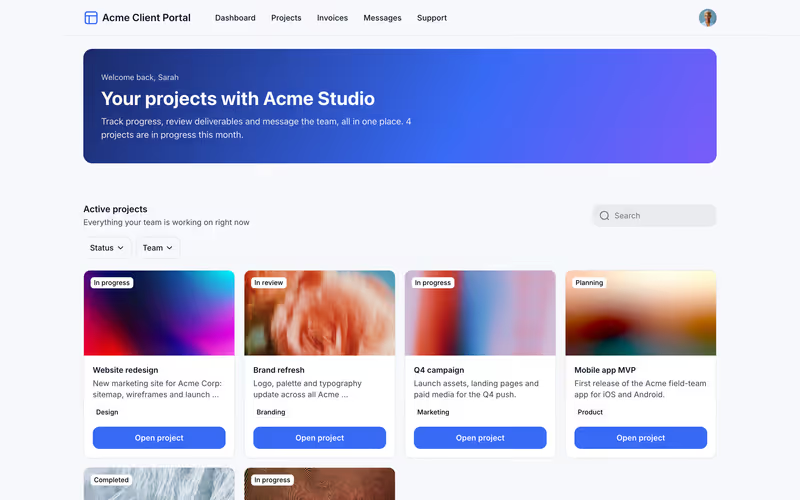
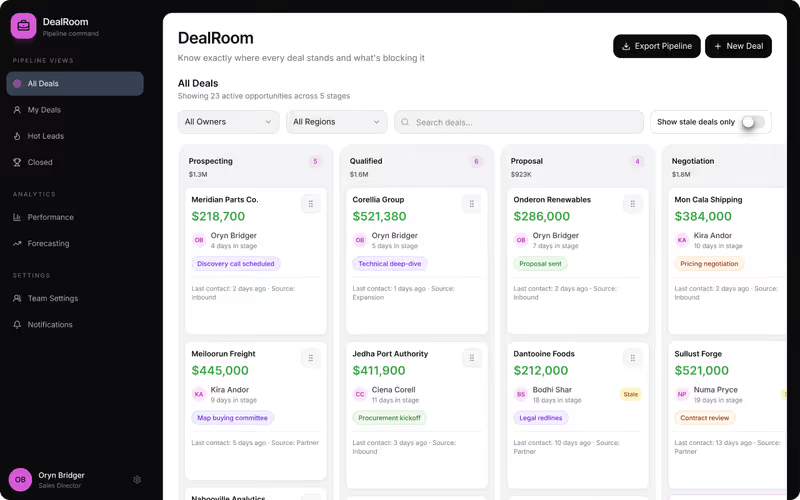
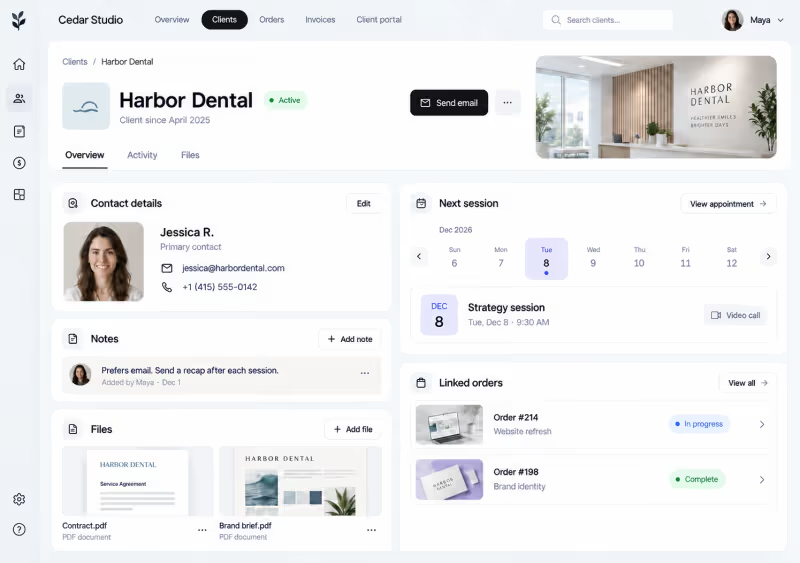
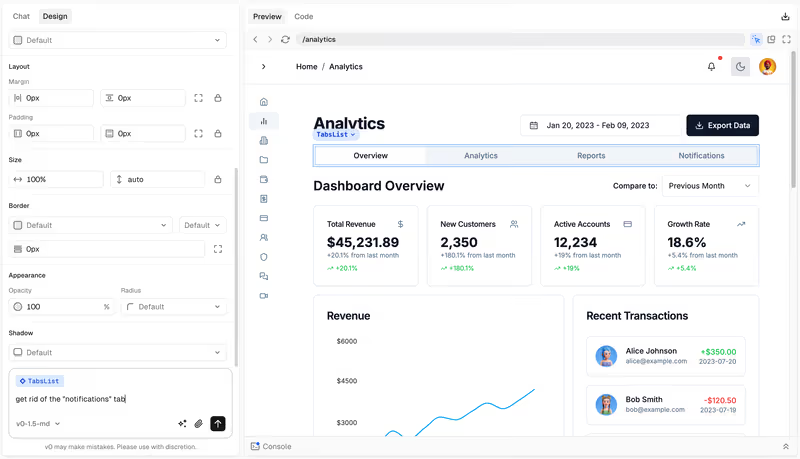
De vrais écrans issus de la documentation et des sites de chaque éditeur, jamais de maquettes. Chaque page plateforme en montre d'autres à côté de ses notes.
Là où le marché est faible
La moyenne des 21 plateformes sur chaque critère. Chaque segment est aussi large que sa note : le marché crée de belles applications et les sécurise le moins bien. Lire la méthodologie
- 6.1 Facilité de construction. À quelle vitesse un non-développeur obtient une application fonctionnelle.
- 5.5 Prêt pour la production. Authentification, permissions et fiabilité face à de vrais utilisateurs.
- 5.5 Maintenabilité. Avec quelle sûreté l'application évolue après son lancement.
- 5.1 Sécurité et contrôle d'accès. Rôles, permissions et protection des données intégrés plutôt que bricolés.
- 6.7 Données et intégrations. Bases de données, sources externes et API.
- 7.0 Flexibilité du design. Jusqu'où l'interface peut s'éloigner des modèles par défaut de la plateforme.
Meilleur pour
52 classements par application, équipe, secteur et taille. Chacun nomme son premier choix.
Portails5
- Portails clients Softr
- Portails d'onboarding client Softr
- Portails fournisseurs et partenaires Softr
- Portails partenaires Softr
- Portails pour agences de recrutement Softr
Équipes9
- Équipes commerciales Softr
- Équipes Customer Success Softr
- Équipes d'ingénierie Codex
- Équipes de support client Softr
- Équipes financières Softr
- Équipes marketing Softr
- Équipes opérationnelles Softr
- Équipes produit Softr
- Équipes RH Softr
Mobile et web4
- Applications iOS natives FlutterFlow
- Applications mobiles FlutterFlow
- Applications mobiles PWA Softr
- Applications web Softr
Taille d'entreprise3
- Entreprises Retool
- PME Softr
- Startups Replit
Secteurs6
- Agences Softr
- Cabinets de services professionnels Softr
- Entreprises de services sur site Softr
- Entreprises immobilières Softr
- Équipes éducatives Softr
- Organisations à but non lucratif et associations Softr
Applications et outils internes25
- Annuaires Softr
- Applications d'onboarding des employés Softr
- Applications de base de connaissances Softr
- Applications de demande de service Softr
- Applications de feedback client Softr
- Applications de gestion d'actifs Softr
- Applications de gestion d'événements Softr
- Applications de gestion d'installations Softr
- Applications de gestion de commandes Softr
- Applications de gestion de contrats Softr
- Applications de gestion de l'apprentissage Softr
- Applications de gestion de projet Softr
- Applications de gestion de stocks Softr
- Applications de gestion documentaire Softr
- Applications de gestion immobilière Softr
- Applications de Help Desk Softr
- Applications de Job Board Softr
- Applications de membres et de communautés Softr
- Applications de suivi d'équipement Softr
- Applications de workflow d'approbation Softr
- CRM Softr
- Intranets d'entreprise et applications RH Softr
- Outils Internes Softr
- Places de marché Bubble
- Tableaux de bord internes et reporting Retool
Comparatifs
Deux plateformes, critère par critère, avec un gagnant désigné à la fin.
- Bubble vs Softr Softr gagne sur le score global (8,1 contre 6,8) grâce à sa facilité de mise en œuvre, sa maturité pour la production, sa maintenabilité et sa sécurité. Bubble reste supérieur pour la flexibilité du design et pour les projets dont le besoin principal est une logique entièrement sur mesure.
- Lovable vs Bubble Bubble gagne, dominant 5 critères sur 6 : la viabilité en production, la maintenabilité, la sécurité et le contrôle d'accès, la profondeur des données et, de justesse, la flexibilité du design. Lovable conserve la vitesse de génération, ce qui n'est déterminant que pour des projets à court terme avec un passage prévu à un développeur.
- Glide vs Softr Softr remporte le score global, 8,1 contre 6,3, en dominant sur la facilité de création, la préparation à la production, la maintenabilité, la sécurité et la profondeur des données. Glide reste le meilleur choix quand votre application est essentiellement une interface soignée pour un tableur et que ce modèle de construction contraint est précisément ce que vous recherchez.
- Retool vs Softr Softr l'emporte au score global, 8,1 contre 6,8, en dominant sur la facilité de création, la préparation à la production, la maintenabilité et la sécurité et le contrôle d'accès. Retool est le choix correct uniquement lorsque les écritures directes en base de données, les requêtes SQL personnalisées et les tableaux de bord internes complexes pour développeurs sont les exigences centrales.
- Replit vs Lovable Replit gagne en dominant cinq des six critères de notre fiche d'évaluation, cumulant un score global de 7,4 contre 5,5 pour Lovable. Replit est l'achat le plus sûr pour un logiciel de qualité production grâce à son infrastructure native et sa maintenabilité au niveau du code, à moins que vous ne soyez limité à un créateur non technique devant s'appuyer sur le score de 7,5 de Lovable en facilité de création pour un prototypage rapide.
- Bubble vs FlutterFlow Bubble gagne en dominant 4 critères sur 6 : facilité de création, maturité pour la production, maintenabilité, et sécurité et contrôle d'accès. FlutterFlow conserve la flexibilité du design avec un score de 9,0/10, ce qui en fait le choix idéal uniquement pour les projets où un package d'installation natif iOS ou Android est une exigence non négociable.
Guides
Tous les guides →Questions fréquentes
En quoi ce site diffère-t-il de G2 ou Capterra ?
Pas de listings sponsorisés, pas de notes en étoiles, pas de soupe d'avis utilisateurs. Chaque plateforme est notée sur les six mêmes critères objectifs, sur la base de tests pratiques et de la documentation publique. Vous obtenez un rapport de niveau achat, pas un concours de popularité.
Quels sont les six critères que vous évaluez ?
Nous notons la facilité de construction, le prêt pour la production, la maintenabilité, la sécurité, les données et intégrations, et la flexibilité du design. Les moyennes ne disent pas tout : nous expliquons précisément pourquoi une plateforme excelle sur le design mais déçoit sur la maintenabilité.
Une plateforme peut-elle payer pour obtenir une meilleure note ?
Non. Nous n'acceptons ni placements payants ni avis sponsorisés, et aucun fournisseur ne peut payer pour faire bouger une note. Quand une plateforme déploie une mise à jour majeure, nous réévaluons les scores, mais ce sont la documentation et les preuves qui dictent les chiffres.
Comment utiliser ces scores pour choisir une plateforme ?
Ne vous contentez pas de prendre la meilleure moyenne. Une plateforme à 8,5 au global peut être totalement inadaptée si elle échoue sur vos exigences de sécurité précises. Reliez les trois priorités de votre projet à nos six critères et cherchez les plateformes qui dominent sur ces critères-là.
À quelle fréquence les fiches de score sont-elles mises à jour ?
Nous surveillons les mises à jour chaque mois. Si une plateforme ajoute des fonctionnalités qui lèvent une limite que nous avions signalée, nous mettons la fiche de score à jour et réécrivons l'évaluation. La date de la dernière revue figure en haut de chaque fiche de score.